I automate the tasks that eat up hours every week, get your software talking to each other, and set up AI assistants that know your own documents. No magic promises: one problem at a time, measured before and after.
Muleky, an app built by HEMGE. Fictional team and players.
Automated quote
Request→Draft→You approve→QuickBooks
AI assessment
Where should a small business start with AI?
With a half-day assessment: we list your repetitive tasks, measure how long they take and pick three costed priorities together. You leave with a clear plan, whether or not you work with me afterwards.
Most businesses without an AI plan think it doesn't apply to them. Yet many already use it without realizing, in their email or their accounting software. My job is to show you, in your own trade, what's worth doing now.
78.1%
of businesses with no AI plans say it isn't relevant to them.
Statistics Canada, Q3 2025
66%
of entrepreneurs were already using AI once shown a list of tools (only 39% thought they were).
BDC, 2024
A good first project has four traits
A frequent, repetitive task
Daily or weekly, and easy to time.
Low-sensitivity data
Or data you can anonymize before handing it to a tool.
Someone who reviews
Nothing reaches a customer without a human check.
Visible results in under three months
Small and measurable beats a vague “transformation”.
You walk away with: an inventory of your tasks, three costed priorities (gain, cost, risk, data involved), recommended tools, the Law 25 points to watch and funding programs that may apply.
Depending on your size, part of the assessment may be subsidized (ESSOR, Investissement Québec). The application goes through the organization itself.
Real use cases
Which tasks can a small business hand over to AI?
The best candidates are repetitive, frequent and follow clear rules. Here's what I set up most often, by department. And sometimes plain automation with no AI does the job: it's simpler and more reliable.
Sales and quotes
Before: copy the products, build the PDF by hand, send it, then re-enter everything in accounting.
Now: a request from your website becomes a draft quote based on your price list. You review it, send it, and it turns into an invoice in one click.
Web form · database · PDF generation · accounting API
Admin and invoices
Before: supplier invoices arrive as PDFs or photos, and someone retypes them one by one.
Now: amounts, dates and suppliers are extracted automatically and sent to your accounting software, ready to approve.
Before: the same questions about hours, lead times and prices, by phone and email, every single day.
Now: an assistant answers from your documents, says clearly that it's automated and hands off to you what it doesn't know.
Website assistant · knowledge base · human hand-off
Data and dashboards
Before: Excel files nobody has time to analyze, a monthly report pieced together by hand.
Now: an always-current dashboard, and an AI that sums up trends and answers your questions in plain language.
Data cleanup · web dashboard · verified summaries
Marketing content
Before: the newsletter and social posts always come last, for lack of time.
Now: a first draft in English and French in minutes, which you rework so it sounds like you. Proofreading stays human.
Prompt library · brand templates · review
HR and internal documents
Before: procedures live in two employees' heads; training a new hire takes weeks.
Now: your notes and videos become clear procedures, then an internal assistant that answers new hires' questions. AI helps write job postings; hiring stays a human decision.
Procedures · document assistant · job postings
Process automation
Automate quotes, invoices and data entry.
I map your process as it really runs, time it, then build the automation and test it with you. After 30 days, we measure the time saved.
Admin tasks are what Quebec SMBs automate first, with a median productivity gain of 17% and 62% of projects paying for themselves in under three years. (CFIB and Investissement Québec, 2025; automation in general, not just AI)
Real example · PoPadema
From request to QuickBooks invoice
Two-factor authenticationDaily backups
Request
Customer form or email
Catalogue
Current products and prices, no copying
PDF quote
Generated with your branding
You approve
A person signs off before it goes out
Send and track
Email, status, follow-up
QuickBooks invoice
Converted in one click, no re-entry
PoPadema is the app I built for a cleaning-solutions company: creating, sending and tracking purchase orders and quotes, syncing with Zoho CRM, then converting them into QuickBooks invoices. Any data shown in my demos is fictional.
API integrations
Connect QuickBooks, Zoho CRM and your website.
An API is a door that lets two pieces of software talk to each other directly. A request filled out on your website can create the customer in your CRM, a draft quote and a follow-up task, without anyone retyping a thing.
Older software, or tools that don't talk? There's often still a way: an automatic export, structured emails or a small in-between database. I propose the simplest solution that holds up, and I document everything so you're not dependent on me.
66% vs. 32%
Growing SMBs are twice as likely as declining ones to have well-integrated tools.
Salesforce, Small & Medium Business Trends Report, 2025 (survey by a software vendor)
QuickBooks
Customers, products, invoices
Zoho CRM
Contacts, leads, follow-ups
Stripe
Payments, subscriptions
Your business, at the centre
Node.js and MongoDB for custom code; Make or n8n when an existing tool is enough.
Google Workspace
Calendar, Gmail, Drive
Microsoft 365
Outlook, Excel, Teams
AWS SES
Transactional email
AI assistant
An AI assistant that knows your own documents.
A good AI assistant answers only from your documents (FAQ, policies, products, procedures), says clearly that it's automated, and hands off to a person when it doesn't know. It's the AI use Canadian businesses plan for most.
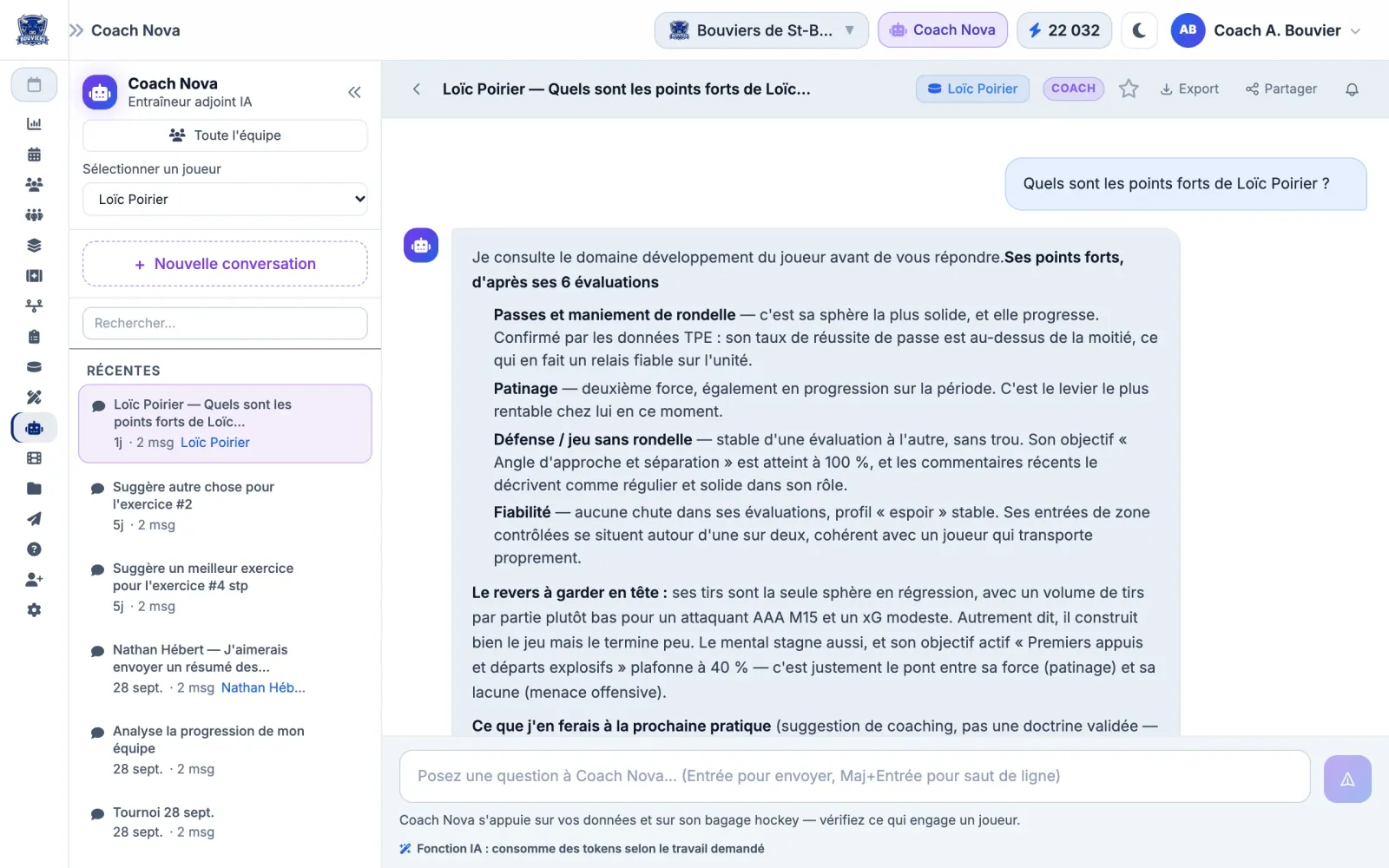
Muleky — Coach Nova
Coach Nova, inside Muleky. The assistant reads the team's evaluations and stats, then suggests a practice plan. The same principle works for your quotes, products or procedures. Fictional team and players.
The rules I apply
Limited to your documents, nothing made up
Shows “you're chatting with an automated assistant”
Hands off to a person when unsure
Tested with your real questions, in English and Quebec French
Answers logged so they can be improved
+14%
more customer requests resolved per hour with an AI assistant, and +34% among newer employees.
Brynjolfsson, Li and Raymond, Quarterly Journal of Economics, 2025
You're responsible for what it says. In 2024, Air Canada had to compensate a customer over wrong information given by its chatbot. Hence my safeguards.
Moffatt v. Air Canada, 2024 BCCRT 149
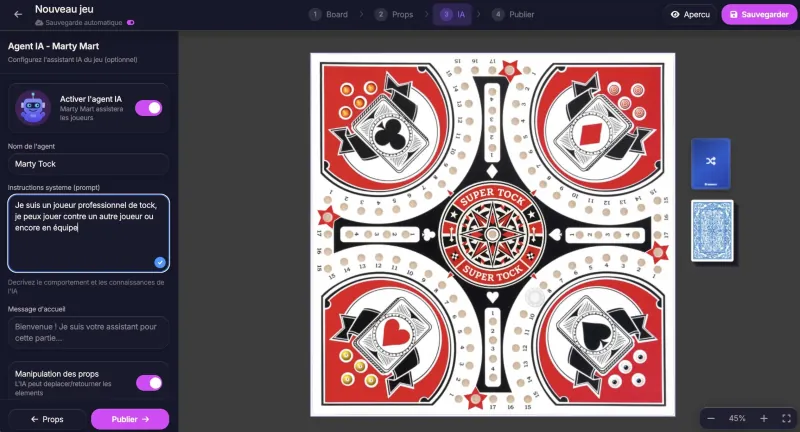
Behind the assistant
You set the name, the tone and the instructions
In Free Board Society, the online board game platform I built, each creator configures their own AI agent: its name, instructions, welcome message and what it's allowed to do. For your business, the logic is the same: you stay in control of what the assistant says and does.
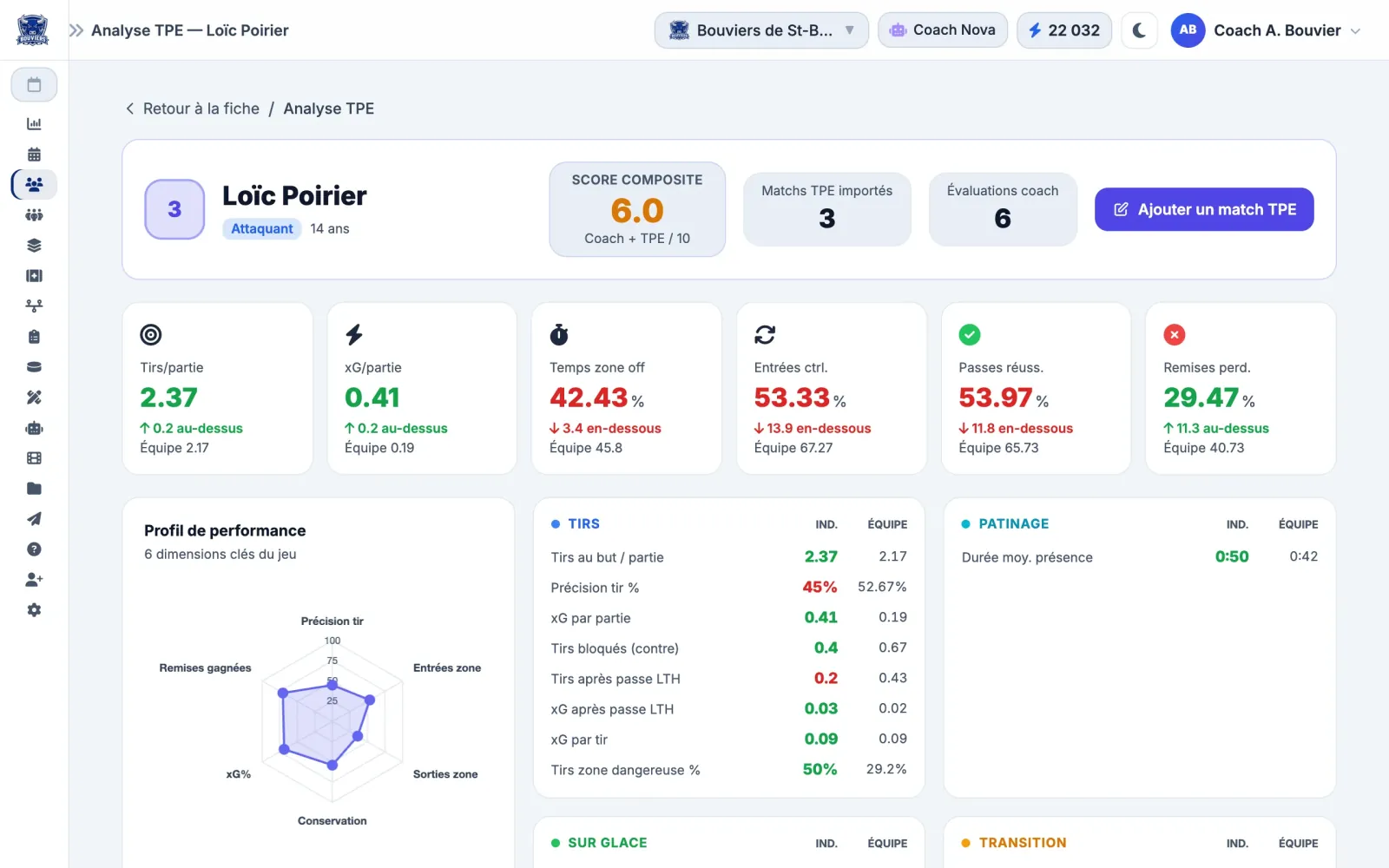
Muleky — team stats
Raw numbers turned into readable comparisons. Muleky, fictional team and players.
Data interpretation
Analyze your sales and Excel files with AI.
AI can clean up your data, write formulas, summarize a monthly report and spot trends. I build the dashboard that brings your numbers together, then connect an AI that explains them in plain language.
One rule never changes: always check the source numbers. AI can get a calculation or an interpretation wrong, and sound very sure of itself.
36.6%
of Canadian businesses that use AI use it to analyze data. It's the number one use.
Statistics Canada, Q2 2026
Prompt training
Train your team to use AI properly.
A three-hour or full-day workshop on your real documents is often enough for a team to handle everyday uses on its own. Each participant leaves with a prompt library tailored to their role.
Write a clear prompt: context, role, format, limits
Check an answer before relying on it
What never goes into an AI tool
Exercises by role, then a follow-up session after 30 days
< 1 in 10
SMBs has access to formal AI training; nearly half of employees who use AI have never been trained.
Diversity Institute and Future Skills Centre, 2026
72%
of micro-businesses roll out AI with their current staff, without hiring a specialist.
Diversity Institute, 2026
Training may sometimes be subsidized by Services Québec (Workforce Training Measure). Rates should be confirmed with a business advisor.
Prompt example
Vague prompt
Write a follow-up email.
Result: generic text that everyone recognizes instantly.
Precise prompt
You are the office manager of a small plumbing company in Lac-Saint-Jean. Write a follow-up email for a quote sent 10 days ago. Warm, professional tone, 80 words maximum. End with one simple question. Do not invent any price or date.
Result: text you can almost send as is, after a quick review.
Data and Law 25
ChatGPT, your data and Quebec's Law 25.
You can use AI and still comply with Law 25, as long as you pick the right plans and set written rules. The problem isn't AI: it's the free version used with no guidelines.
I'm not a lawyer: I provide practical groundwork and work with your legal advisor when needed.
My four ground rules
01
No names, emails, numbers or identifiable files in a free or personal version of an AI tool.
02
Anonymize, or replace names with codes, before asking for an analysis.
03
Business plans or the API for customer data, with a short privacy impact assessment.
04
A human in the loop for any decision that affects an individual (hiring, credit, refusals).
Your AI use policy
One or two pages, presented to the team in 30 minutes:
Approved tools and accounts
Forbidden and allowed data
Mandatory human review
Transparency and copyright
A named owner, reviewed every six months
What happens to your data, by plan
ChatGPT Free, Plus or Pro
May be used for training unless you turn it off
ChatGPT Team, Enterprise, API
No training by default
Claude Free, Pro or Max
Training only if the option is turned on
Claude for Work, API
No training by default
OpenAI help pages and Anthropic's terms (August 28, 2025 update), checked in October 2026. Terms change: check before you choose.
53%
of Quebec workers have no clear guidelines from their employer on AI.
NETendances 2025, Université Laval
63%
of Quebec internet users worry about the privacy of their data in generative AI.
NETendances 2025, Université Laval
Since September 22, 2024, all of Law 25 is in force. Before sending personal information outside Quebec, which most cloud AI tools do, you must assess the risks and be able to justify your choice in writing.
Government of Quebec; Raymond Chabot Grant Thornton, 2024
Realistic gains
How much time does AI really save?
Serious studies measure real but modest gains: roughly one to two hours a week per person. Over a year and a whole team, that adds up. Be wary of anyone promising “ten times the productivity”.
2.2 h
per 40-hour week, on average, for workers who use generative AI.
Federal Reserve Bank of St. Louis, 2025
26 min
a day on writing, email and meetings, in a trial with 20,000 civil servants.
Government of the United Kingdom, 2025
17%
median productivity gain in Quebec SMB automation projects.
CFIB and Investissement Québec, 2025
2%
of organizations see a return on generative AI. The difference: a specific problem and a measurement.
KPMG Canada, 2025
How it works
How does an automation project work?
One process at a time, in five steps. “Complete transformation” projects are the ones that go off the rails most often.
01
Assessment
We pick the process that costs you the most time.
02
Measure before
We note the time and frequency, to compare later.
03
Prototype
A first working version within days, on your real data.
04
Go live
Testing, security, backups, documentation and user training.
05
Measure after 30 days
We compare. If the gain is real, we move to the next process.
Tools and technologies
OpenAI API
Claude API (Anthropic)
Gemini
Microsoft Copilot
Node.js
MongoDB
QuickBooks API
Zoho CRM
Stripe
Google Workspace
Microsoft 365
AWS SES
Make
n8n
Cloudflare
Common questions
AI and automation: your questions.
The short answers. For costs, funding and tools in detail, see the full FAQ.
It depends on the process and the software involved. Connecting two applications is a few days of development; a custom tool, like a quote generator or an assistant, is a bigger project. That's why I start with an assessment: you know the expected gain and the cost before you decide.
Should we automate everything at once?
Definitely not. I automate one process at a time, we fine-tune it, then move to the next. And a person keeps the sign-off at critical steps, like sending a quote or a payment: automation should save you time, not take away your control.
Does every automation need AI?
No. Moving a website request into your CRM or sending an appointment reminder is classic automation, simpler and more reliable. I add a language model only where it brings something: reading a free-form email, extracting invoice data, writing a first draft.
Can AI make mistakes in my quotes?
Yes, and confidently. That's why prices come from your price list, not from the AI, and why a person reviews any document containing numbers, commitments or legal content before it reaches a customer.
Are there grants for adopting AI in Quebec?
Yes, depending on your size. ESSOR (Investissement Québec) can cover up to 50% of a digital assessment that includes AI for businesses with at least $2.5M in revenue, and Services Québec can subsidize part of the training. I can point you in the right direction; the application goes through the organization.