Skip to content

Services

Five crafts, one person to talk to.

From automating your processes to designing your logo, I handle everything it takes to bring a small business up to date in 2026. You deal directly with the person doing the work, from the first call to delivery.

Or start from your need: 12 needs, 12 answers

Your need → my service

What does your business need right now?

These are the twelve needs Canadian and Quebec businesses report most often, backed by real numbers. Find yours: each one leads straight to the service that answers it.

  1. 01

    Make sense of your numbers

    Sales, Excel files, monthly reports: data analysis is the number one use of AI in Canada, at 36.6% of businesses that use it.

    Statistics Canada, Q2 2026

    Data and dashboards
  2. 02

    Write, summarize and sort faster

    Emails, documents, procedures: writing communications is the top use among workers who use AI (57%).

    Federal Reserve Bank of St. Louis, 2025

    Workshop and prompt library
  3. 03

    Answer customers, even after hours

    A chatbot is the AI use Canadian businesses plan for most (34.8%).

    Statistics Canada, Q3 2025

    AI assistant on your documents
  4. 04

    Less paperwork

    Quotes, invoices, data entry: admin is what Quebec SMBs automate first, with a median productivity gain of 17%.

    CFIB and Investissement Québec, 2025

    Automate one process
  5. 05

    Get your software talking

    Accounting, CRM, website, payments: growing SMBs are twice as likely to have well-connected tools (66% vs. 32%).

    Salesforce, 2025 (survey by a software vendor)

    API integrations
  6. 06

    Publish marketing more often

    Visuals, copy, video: 25.6% of businesses planning to adopt AI are aiming at marketing automation.

    Statistics Canada, Q3 2025

  7. 07

    Know where to start with AI

    78.1% of businesses with no AI plans say it isn't relevant to them. Often, nobody has shown them an example from their own trade.

    Statistics Canada, Q3 2025

    Half-day AI assessment
  8. 08

    Train your staff

    21% of Quebec workers say their employer has no position on AI, and 32% don't know what it is.

    NETendances 2025, Université Laval

    Team workshop
  9. 09

    Protect your data and comply with Law 25

    Cybersecurity and privacy are the top barrier businesses report (13.4%).

    Statistics Canada, Q2 2026

    Data and Law 25
  10. 10

    Keep costs under control

    Cost is the second barrier (10.6%, and 15.1% among businesses with 20 to 99 employees). That's why I work in short pilot projects, measured before and after.

    Statistics Canada, Q2 2026

    Costs and funding programs
  11. 11

    Get found on Google and in AI answers

    A real, new need with no reliable Canadian figure yet. What we do know: when Google shows an AI summary, people click links half as often.

    Pew Research Center, 2025 (United States)

    A site Google and AI can read
  12. 12

    A professional, up-to-date image

    A permanent need that has nothing to do with AI: customers judge you first by your logo, your website and your printed material.

    Permanent need

    Logo and branding

What I don't do, honestly

  • IT management and cybersecurity (computers, networks, security audits): I'll point you to an IT specialist.
  • Legal advice on Law 25: that's a job for a lawyer or your privacy officer. I'm happy to work alongside them.
  • Industrial AI (computer vision on the factory floor, sensors, robotics): see a specialized integrator or a research centre.
  • Advanced setup of Acomba, Sage or an ERP: your vendor handles that; I connect those systems to the rest through their API.
  • Ad campaign management (Google Ads, Facebook, TikTok): I create the images and videos for your ads, then my partner Lynova sets up and runs the campaign.
  • Automated résumé screening: I advise against it (risk of bias, Law 25 obligations). I'd rather help you write clear job postings and interview grids; the decision stays human.
Core service Law 25

AI integration and automation

I find the tasks that eat up hours every week (quotes, invoices, emails, reports) and hand them to well-connected tools. Your software talks to each other through APIs, an assistant answers from your own documents, and your team learns to use AI properly.

  • Process assessment
  • QuickBooks, Zoho, Stripe integrations
  • AI assistants on your own data
  • Prompt training for your team
  • Dashboards and data interpretation
  • AI use policy
Explore this service
Coach Nova — built-in AI assistant
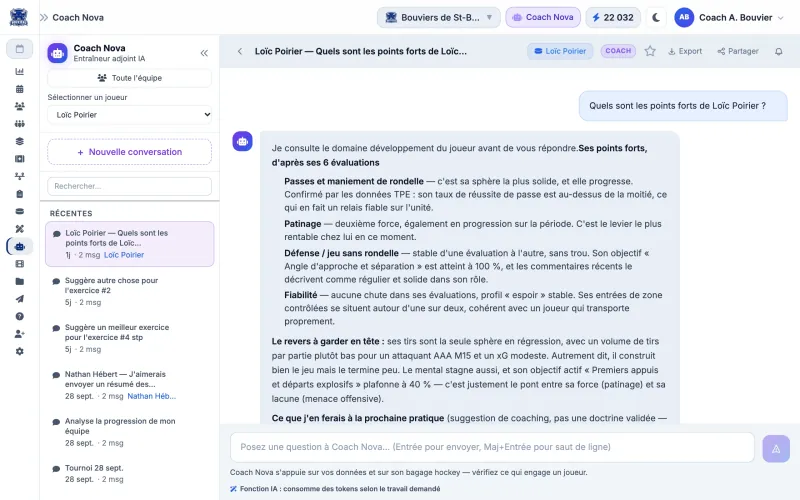
Conversation with Coach Nova, the AI assistant built into the Muleky app, about a player's strengths (fictional team and players)

Muleky, an app built by HEMGE. Fictional team and players.

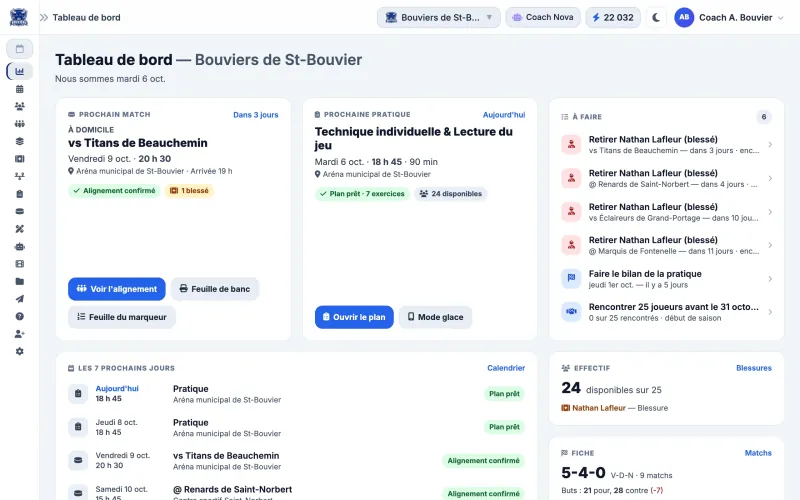
Dashboard of the Muleky web app, built with Node.js and MongoDB (fictional team)

Custom web development

Fast, secure websites and web apps that are easy to grow. Clean code with no bloated theme or questionable plugins, built for your visitors, for Google and for AI answer engines.

  • Node.js
  • MongoDB
  • Cloudflare
  • UX/UI
  • EN · FR
Learn more
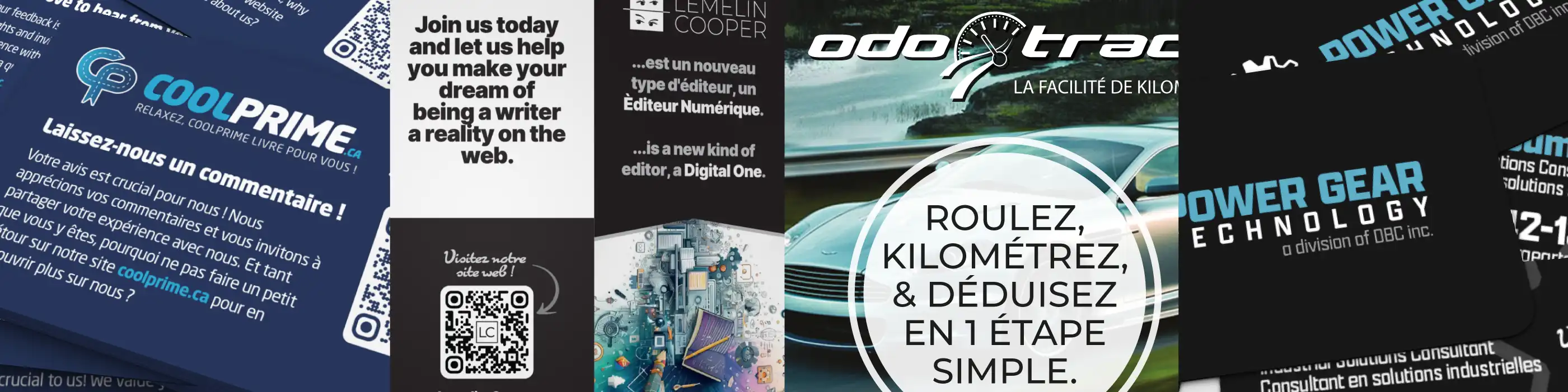
Printed pieces designed by HEMGE: CoolPrime feedback card, leaflets and posters

AI-assisted graphic design

Brochures, posters, social media visuals, labels and packaging. AI speeds up exploration in Illustrator, Photoshop, Firefly and Leonardo; my designer's eye makes the final call.

  • Illustrator
  • Photoshop
  • Firefly
  • Leonardo
Learn more
Logos designed by HEMGE for small businesses: CoolPrime, Dishco, DBC, Lemelin Cooper, Inter Femmes, Power Gear Technology

Logo and branding

A hand-drawn logo, brand guidelines, business cards, stationery, signage and social templates. One consistent image everywhere, from your website to your delivery truck.

  • Vector logo
  • Brand guidelines
  • Brand refresh
Learn more
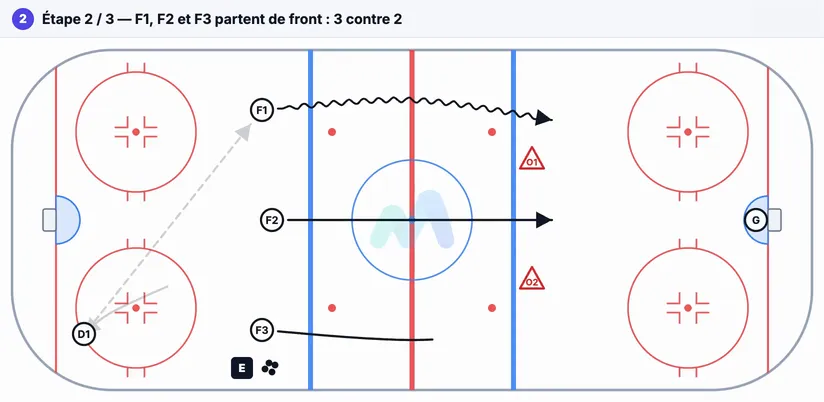
Still from an animated hockey drill made for Muleky

AI-assisted video editing

I was editing video long before AI. Today, from a single shoot, I produce a series of captioned clips cut for each platform, on a small-business budget.

  • CapCut
  • 9:16 · 1:1 · 16:9
  • EN · FR captions
Learn more

How I work

Diagnosis first. Technology second.

I don't sell a tool before I understand your day. We start from what frustrates you, pick one problem, and measure the time before and after. If the gain is real, we move on to the next one.

  1. 01

    We look at how you really work

    Your processes, your software, your pain points. I'll tell you straight where AI is worth it and where it isn't.

  2. 02

    One measurable project

    A frequent, low-risk task whose time we can measure. Visible results in under three months.

  3. 03

    A human in the loop

    AI prepares, someone on your team approves. Especially for prices, commitments and payments.

  4. 04

    Documented and handed over

    Your team is trained and everything is documented. You're not dependent on me for what comes next.

Ways to get started

Seven practical ways to take a first step.

Short engagements with a clear deliverable you can use even if we don't go any further together. Pricing depends on your situation; we'll cover it on the first call.

Starting point On site or remote

Half-day AI assessment

“Where do I start?”

For owners who know they should be doing something but aren't sure what. We spend three to four hours together on your repetitive tasks, then I hand you a short report.

Depending on the size of your business, part of the assessment may be subsidized (for example through Investissement Québec's ESSOR program). I can point you in the right direction; the application goes through the organization itself.

You walk away with

  • An inventory of your repetitive tasks and how long they take
  • Three costed priorities: expected gain, cost, risk, data involved
  • Recommended tools and the Law 25 points to watch
  • Funding programs that might apply to you
Book an assessment
Starting point

“Using AI well at work” workshop

For teams of 3 to 20 people who already use ChatGPT or Copilot, each on their own. Three hours or a full day, on your real documents.

Deliverable: a prompt library for each role, the ground rules (what never goes into AI) and a follow-up session after 30 days.

AI and automation
Starting point

AI use policy and Law 25

For any business whose employees use AI without written rules. Practical groundwork, not legal advice.

Deliverable: a one- or two-page policy, a cheat sheet for employees, a 30-minute team presentation and a list of points to confirm with a lawyer.

AI and automation
Pilot project

Automate one process

For businesses that keep re-entering the same data between their website, email, CRM and accounting.

Deliverable: a map of the current process, the automation built and tested, documentation, training, and a measurement of time saved after 30 days.

AI and automation
Audit first

A website AI engines can read

For businesses whose site is slow, dated or vague about what they offer. We start with an audit; a rebuild only if it's justified.

Deliverable: speed, structure, structured data, Google profile, AI crawler access: a prioritized list of fixes. No promise of showing up in ChatGPT.

Web development
Starter kit

AI-assisted branding

For new businesses and SMBs that want a fresher image without an agency budget. AI explores directions; I draw the final logo by hand.

Deliverable: a vector logo in several versions, colour palette, typefaces, a short usage guide and social media templates.

Logo and branding
Series

Small-budget video clips

For businesses that know they should be doing video (hiring, products, testimonials) but have no production budget.

Deliverable: a clip plan, a phone-shooting guide for your team, then editing, captions and formats for each platform.

Video editing

All at once: “AI Kickstart”

The assessment, the team workshop and the use policy, all in the same month. You know what to do, your team knows how, and the rules are in writing.

Talk about it